
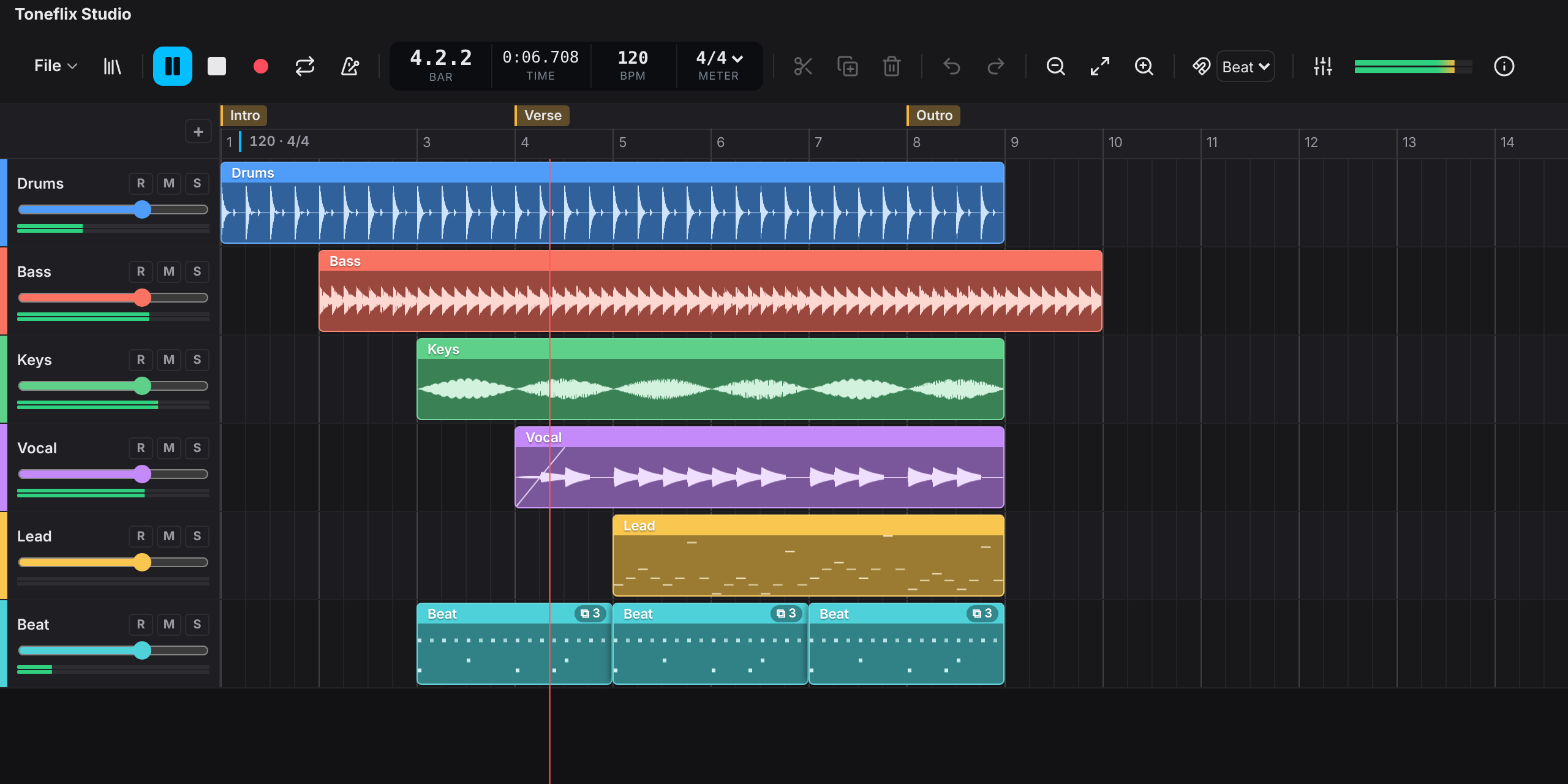
The studio engine for the web. Give any web app a real multitrack editor. Your users arrange, cut and shape audio as freely as in a desktop DAW, right in the browser.
- Edit without limits. Split anything, drag clips anywhere, layer them and move them between tracks. Nothing snaps back unless you ask it to.
- Hear every edit. Playback follows the timeline as you work, with a mixer, effects, loops, a metronome and mixdown to WAV.
- Play instruments. Instrument tracks play note clips through a built-in synth, drum kit or sampler, or any Web Audio Module instrument. Draw and edit their notes in a piano roll, or program beats in a step sequencer with swing, with a mouse or on a phone. Load your own samples onto drum pads and sampler keys. Play and record notes on on-screen keys, the computer keyboard or a MIDI device.
- Record over the mix. Arm a track and record a voice or instrument while the music plays. Takes land where they were performed, with the waveform drawn as you go.
- Plugins, live. Put Web Audio Module plugins on any track or the master and hear them as you play, with their own editors. They are saved with the project and printed into the mix.
- Fast with big sessions. Waveforms are drawn in the background and cached on the device, so long recordings open instantly the next time.
- Fits any stack. No framework and no dependencies. Use the built-in toolbar and track controls, swap their icons for your own, or build your own UI on the same API.
- Open by design. MIT licensed. Project exchange with the desktop DAWs musicians already use is on the roadmap.
Read the docs and try the playground at toneflix.github.io/studio.
Status: early. The timeline, waveforms, playback and recording are here. Project exchange with desktop DAWs is planned.
import { AudioEngine, StudioTimeline, Waveforms, linkPlayback, makeClip, uid } from '@toneflix/studio';

const engine = new AudioEngine();

const timeline = new StudioTimeline('#editor', {
  grid: { bpm: 120, meter: [4, 4], snap: 'beat' },
  createTrack: () => ({ id: uid('t'), name: 'New stem' }),
});

timeline.load({
  tracks: [{ id: 'vox', name: 'Vocals' }],
  clips: [makeClip({ track: 'vox', source: 'vox.wav', start: 0, offset: 0, duration: 12 })],
});

// Peaks are worked out in a worker and kept in Cache Storage, so a stem is analysed once per device
const waveforms = new Waveforms();
const audio = await engine.context.decodeAudioData(bytes);
const peaks = await waveforms.get('vox.wav:v1', () => audio);
timeline.setSource({ id: 'vox.wav', duration: audio.duration }, peaks);

// Play it: edits are heard at once, the playhead follows, Space plays and pauses
engine.setBuffer('vox.wav', audio);
linkPlayback(timeline, engine);

timeline.on('change', ({ state, final }) => final && save(state));| Gesture | What it does |
|---|---|
| Drag a clip | Moves it in time and to other lanes; past or over other clips. Below the last lane makes a new one (with createTrack) |
| Drag a clip edge | Trims it, up to the ends of its audio |
| Drag a corner handle | Fade in or out |
| Click, Shift or Ctrl/Cmd click | Select, add to or toggle the selection |
| Drag on an empty lane | Selects the clips the box touches (Shift adds to the selection) |
| Drag on the ruler | Selects a time range across all tracks |
| Alt while dragging | Turns snapping off |
| Ctrl/Cmd + wheel | Zoom around the pointer |
| S, Delete, Ctrl+D, Ctrl+A | Split at the playhead, delete, duplicate, select all |
| Arrows | Nudge by the snap step, or move up and down a lane |
| + above the headers, click a track name | Add an empty audio track, audio from a file, or an instrument, drum or sampler track; rename, duplicate, move or delete one from its menu |
| Double-click an empty spot on an instrument track | Adds a one-bar note clip |
| Double-click a note clip | Opens it in the piano roll: click to draw notes, drag to move or resize them. Drum clips open as a step sequencer with swing |
| Markers and tempo in the ruler | Right-click the ruler to add a marker or tempo change, or double-click above the bar numbers for a marker; drag to move, click a marker to jump there, click a tempo to set it or the meter |
| Track menu, Show volume/pan automation | Opens a lane under the track: click to add points, drag to move, double-click to remove |
| Ctrl+Z, Ctrl+Shift+Z | Undo and redo |
Where clips overlap on a lane, the one that starts later is on top and is the one heard. audibleRanges(clips) gives the heard part of each clip, for players and mix renderers.
Install @toneflix/studio for everything, or only the parts your app uses. Every package is released with the same version.
| Package | What it gives you |
|---|---|
@toneflix/studio |
Everything below, from one import |
@toneflix/studio-core |
Tracks, clips, pure edits (splitClips, moveClips, trimStart, setFades…), snapping, TimelineModel and History. No DOM or audio, so it also runs on servers and in tests |
@toneflix/studio-waveforms |
Waveforms, PeaksWorker, PeaksCache and drawWaveform: peaks off the main thread, cached on the device |
@toneflix/studio-audio |
AudioEngine: playback with a mixer, effects, volume and pan automation, loops, a metronome and offline mixdown |
@toneflix/studio-recorder |
Recorder: records a microphone or line input onto a track, lined up with what was playing; NoteRecorder records notes played live |
@toneflix/studio-plugins |
PluginRack: Web Audio Module (WAM 2) plugins on tracks and the master, live, with their editors, saved with the project and in the mixdown |
@toneflix/studio-wams |
curatedWams and curatedWamSource: reviewed Web Audio Module effects, served pinned from jsDelivr |
@toneflix/studio-exchange |
saveProject and openProject: sessions in the app's own format with plugins, or to and from REAPER, with tracks, clips, fades, automation, markers, tempo and the audio; instrument tracks to and from MIDI files |
@toneflix/studio-controls |
StudioToolbar, trackStrip, StudioMixer, StudioBrowser, StudioPianoRoll and StudioKeys: playback, recording and editing buttons, track arm, mute, solo and volume, a mixer with plugin slots, a browser of sounds and plugins from any source, a piano roll and step sequencer, and keys with MIDI input, with Lucide icons you can replace |
@toneflix/studio-timeline |
StudioTimeline, the editor view. Restyle it with the --tfs-* CSS variables or fill track headers with renderHeader |
pnpm install
pnpm test        # node --test, no browser needed
pnpm demo        # the demo page with made-up audio
pnpm docs:dev    # the docs site with a live playground
pnpm build # each package's dist/ with type declarationsPublish a GitHub release tagged with the version, like v0.2.0. The Publish workflow takes the version from the tag, runs the checks, publishes every package to npm and saves the version in each package.json on the default branch. A release marked as a pre-release goes out under the next tag.
To publish without a release, run the Publish workflow from the Actions tab with a version and a dist-tag.
MIT