

Standalone desktop downloader for editor-ready YouTube media.


LambDownload lets you search or paste a YouTube URL, choose a quality, download the media locally, and drag the finished file directly into Premiere Pro, After Effects, DaVinci Resolve, Finder, Explorer, or any app that accepts file drops.
- Standalone App - No Adobe extension install, no CEP, no UXP, no panel setup.
- No API Keys - Search and download run locally without YouTube API keys.
- Bundled Runtime - Desktop builds include Python 3.13 and downloader libraries, so users do not install Python or
yt-dlp. - Editor-Safe Output - Video downloads are transcoded to H.264/AAC MP4 with
yuv420pand faststart metadata. - Drag-Out Library - Completed files stay in the app so you can drag them into timelines or folders.
- Quality Modes - 1080p, 4K, Audio Only, and Proxy.
- Auto Update - Checks GitHub Releases and can be turned off in the app.
- Sponsor Ready - Includes
.github/FUNDING.ymlfor the GitHub sponsor button.
Download the latest release from:
https://github.com/shazeus/LambDownload/releases/latestSimple source setup:
npm run setupOr double-click:
- macOS:
installers/setup.command - Windows:
installers/setup.bat - Windows PowerShell:
installers/setup.ps1
The source setup checks Node and npm, installs or updates JavaScript packages, prepares the bundled Python downloader runtime, builds the app, writes local settings, and creates a launcher. Native desktop installers already include the runtime.
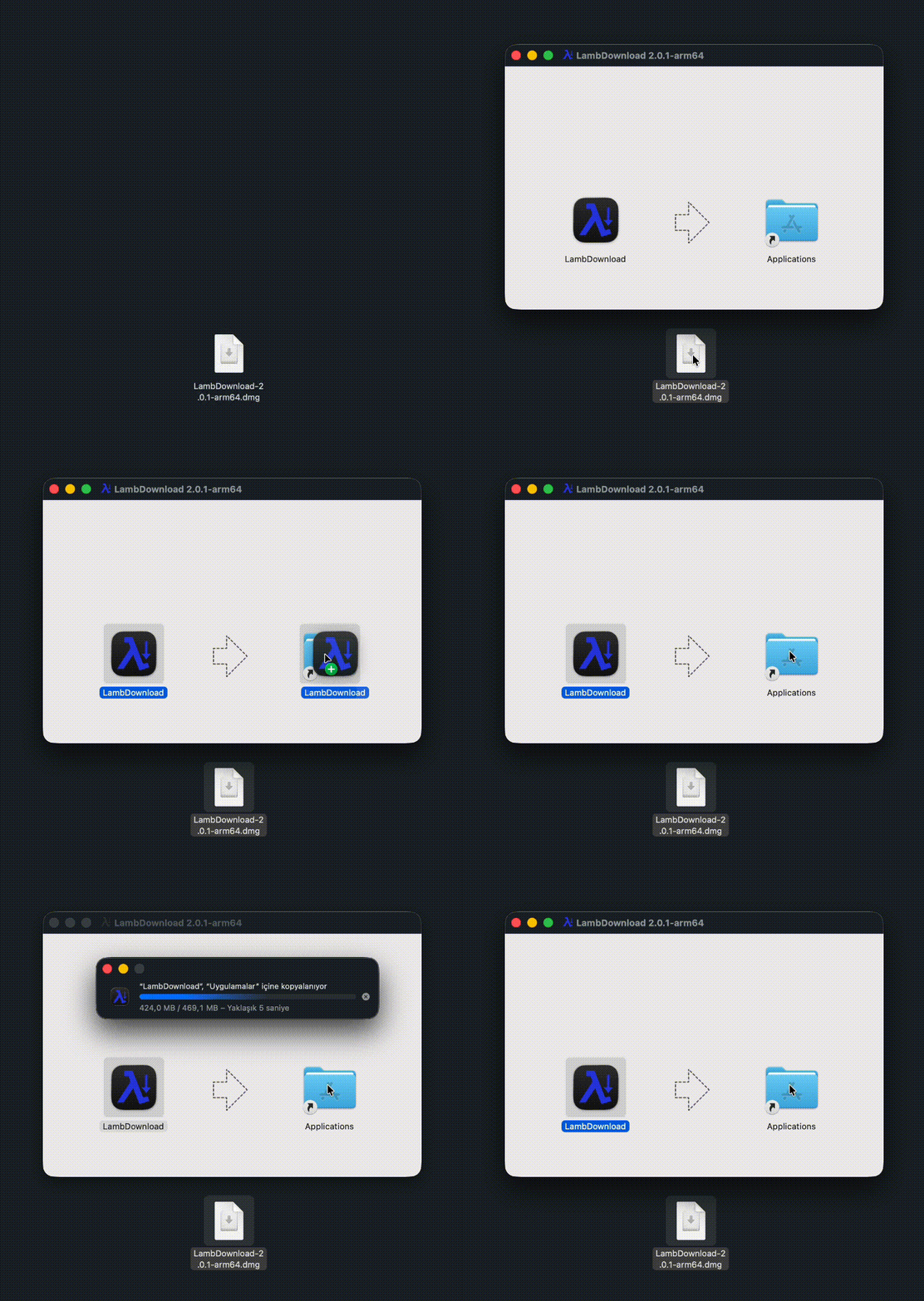
macOS installation:
Auto-update can be disabled during setup:
npm run setup -- --auto-update=false# Start the standalone desktop app
npm run desktop
# Development mode
npm run desktop:dev
# Local API only
npm run service
# Web preview only
npm run dev
# Build web assets
npm run build
# Build release zips
npm run release:pack
# Build native desktop package
npm run desktop:packUsage example:
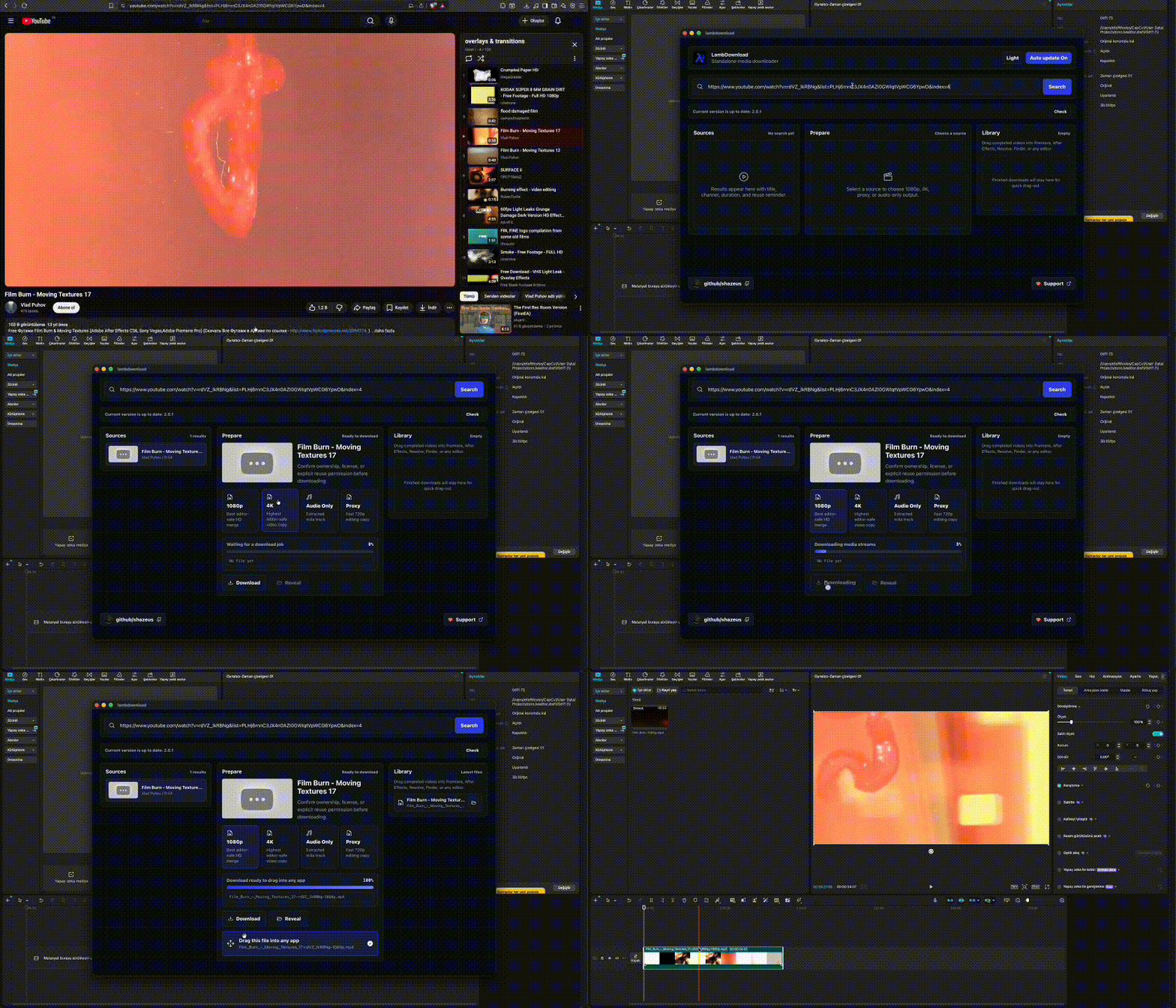
Inside the app:
- Paste a YouTube URL or search by title.
- Pick
1080p,4K,Audio Only, orProxy. - Download the media through the local Python worker.
- Drag the finished file from LambDownload into any editor, folder, or timeline.
Downloads are saved locally:
~/Movies/LambDownloadVideo modes generate editor-safe .mp4 files:
H.264 video
AAC audio
yuv420p pixel format
faststart metadata
Audio-only mode generates .m4a files.
LambDownload checks shazeus/LambDownload GitHub Releases through the local service.
Users can turn this off inside the app. The setting is stored locally:
~/.lambdownload/config.jsonManual self-update:
npm run update:selfCreate and push a tag:
git tag vX.Y.Z
git push origin vX.Y.Z
GitHub Actions builds and publishes:
release/lambdownload-release.zip
release/lambdownload-vX.Y.Z-macos-linux.zip
release/lambdownload-vX.Y.Z-windows.zip
dist-desktop/*.dmg
dist-desktop/*.zip
dist-desktop/*.exe- The React/Electron app sends a URL or search term to the local Node service.
- Node calls
scripts/python_downloader.py. - Python
yt-dlpresolves metadata and available formats. - The selected stream is downloaded into a temporary folder.
- ffmpeg creates a stable editor-safe output.
- The final file is moved to
~/Movies/LambDownload. - Electron exposes the file for drag-and-drop into other apps.
Only download videos you own, licensed media, or content you have explicit permission to reuse. LambDownload does not bypass private access controls. It is a local workflow tool for authorized media handling.
Creative Commons Attribution-NoDerivatives 4.0 International
LambDownload, YouTube URL'si yapıştırarak veya arama yaparak video bulmanı, kalite seçmeni, medyayı yerel olarak indirmeni ve tamamlanan dosyayı Premiere Pro, After Effects, DaVinci Resolve, Finder, Explorer veya dosya sürükle-bırak kabul eden herhangi bir uygulamaya doğrudan taşımanı sağlar.
- Standalone Uygulama - Adobe extension kurulumu, CEP, UXP veya panel ayarı gerektirmez.
- API Key Yok - Arama ve indirme YouTube API key istemeden yerelde çalışır.
- Paketli Runtime - Masaüstü build'leri Python 3.13 ve indirme kütüphanelerini içerir; kullanıcılar Python veya
yt-dlpkurmaz. - Editor-Safe Output - Video indirmeleri H.264/AAC MP4,
yuv420pve faststart metadata ile editör uyumlu hale getirilir. - Drag-Out Library - Tamamlanan dosyalar uygulamada kalır; timeline'lara veya klasörlere sürükleyebilirsin.
- Kalite Modları - 1080p, 4K, Audio Only ve Proxy.
- Auto Update - GitHub Releases kontrol eder ve uygulama içinden kapatılabilir.
- Sponsor Ready - GitHub sponsor butonu için
.github/FUNDING.ymliçerir.
Son release'i buradan indir:
https://github.com/shazeus/LambDownload/releases/latestBasit kaynak kurulumu:
npm run setupYa da çift tıkla:
- macOS:
installers/setup.command - Windows:
installers/setup.bat - Windows PowerShell:
installers/setup.ps1
Kaynak kurulumu Node ve npm'i kontrol eder, JavaScript paketlerini kurar veya günceller, paketli Python downloader runtime'ını hazırlar, uygulamayı build eder, yerel ayarları yazar ve launcher oluşturur. Native masaüstü installer'ları runtime'ı zaten içerir.
macOS kurulumu:
Auto-update kurulum sırasında kapatılabilir:
npm run setup -- --auto-update=false# Standalone masaüstü uygulamasını başlat
npm run desktop
# Development modu
npm run desktop:dev
# Sadece local API
npm run service
# Sadece web preview
npm run dev
# Web asset build
npm run build
# Release zip build
npm run release:pack
# Native desktop paketi build et
npm run desktop:packKullanım örneği:
Uygulama içinde:
- YouTube URL'si yapıştır veya başlığa göre ara.
1080p,4K,Audio OnlyveyaProxyseç.- Medyayı local Python worker ile indir.
- Tamamlanan dosyayı LambDownload'dan herhangi bir editör, klasör veya timeline'a sürükle.
İndirmeler yerelde saklanır:
~/Movies/LambDownloadVideo modları editör uyumlu .mp4 dosyaları üretir:
H.264 video
AAC audio
yuv420p pixel format
faststart metadata
Audio-only modu .m4a dosyası üretir.
LambDownload, local servis üzerinden shazeus/LambDownload GitHub Releases kontrolü yapar.
Kullanıcılar bunu uygulama içinden kapatabilir. Ayar yerelde saklanır:
~/.lambdownload/config.jsonManuel self-update:
npm run update:selfTag oluşturup pushla:
git tag v2.1.5
git push origin v2.1.5
GitHub Actions şunları build edip yayınlar:
release/lambdownload-release.zip
release/lambdownload-vX.Y.Z-macos-linux.zip
release/lambdownload-vX.Y.Z-windows.zip
dist-desktop/*.dmg
dist-desktop/*.zip
dist-desktop/*.exe- React/Electron uygulaması URL veya arama terimini local Node servisine gönderir.
- Node
scripts/python_downloader.pydosyasını çağırır. - Python
yt-dlp, metadata ve uygun formatları çözer. - Seçilen stream geçici klasöre indirilir.
- ffmpeg sabit, editör uyumlu çıktı oluşturur.
- Final dosya
~/Movies/LambDownloadklasörüne taşınır. - Electron dosyayı diğer uygulamalara sürükle-bırak için hazırlar.
Yalnızca sahibi olduğun, lisanslı veya yeniden kullanmak için açık iznin olan videoları indir. LambDownload özel erişim kontrollerini aşmaz. Yetkili medya işlemleri için yerel bir workflow aracıdır.
Creative Commons Attribution-NoDerivatives 4.0 International