
A tiny, open-source Android home-screen widget for your phone battery and connected Bluetooth devices.
You can download it here or tapping on the 'releases' page.
Probably the only truly free battery widget you'll find.
- Actually open source and works. Most of the free battery widgets in the Playstore have the same feature as in this app except behind a paywall, or it's source code is proprietary.
- Lightweight and offline
- Good looking
- Free (as in freedom)
- No Google dependencies.
- Below is an image of the widget working on LineageOS.
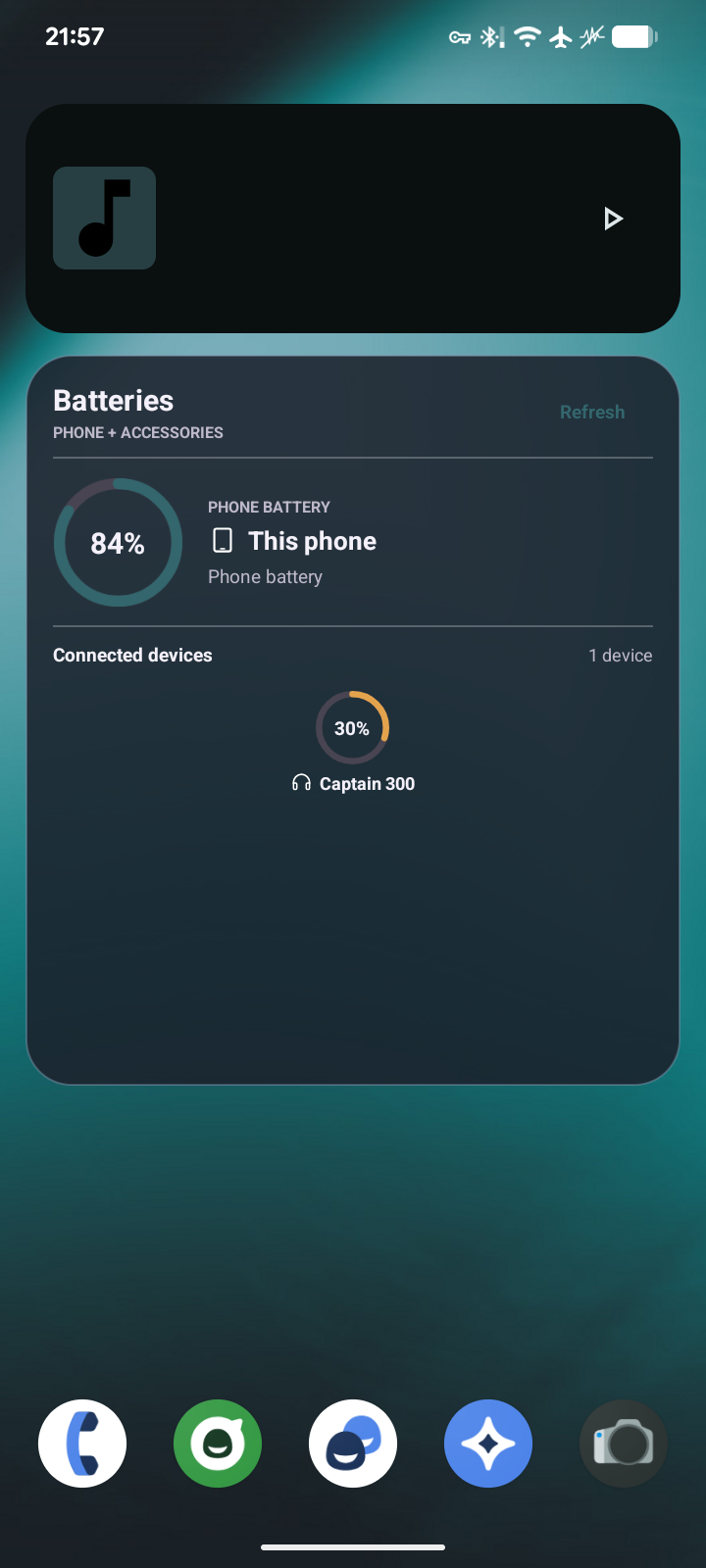
The widget may take a minute to start refreshing, and then show your battery percentage.
- A circular, iOS-inspired battery ring for the phone and each connected Bluetooth accessory.
- Accessory tiles use phone, headset, speaker, and unknown-device glyphs, with a percentage when Android supplies one.
- Simple phone, headset, speaker, and unknown-device icons.
- Material You palette or a translucent, frosted-glass-style surface, with matching dark-mode drawables.
- A custom adaptive launcher icon, including Android 13 themed-icon artwork.
- Uses native Android widgets and Bluetooth APIs only: no Compose, AndroidX, analytics, ads, accounts, or network permission.
- Bluetooth device discovery uses the connected A2DP, Headset, GATT, Hearing Aid, and LE Audio profiles.
- Device battery values are shown when the Android Bluetooth stack reports them; otherwise the widget displays
—.
The widget is built entirely with framework RemoteViews; it does not use Compose, Glance, or custom View classes inside the launcher. Battery rings are rendered as small bitmaps and applied with RemoteViews.setImageViewBitmap, while all text, visibility, and background changes use framework-supported RemoteViews actions.
In particular, the widget deliberately avoids calling View.setBackgroundTintList through RemoteViews.setColorStateList. Although the API accepts a method name, RemoteViews only permits methods annotated with @RemotableViewMethod; View.setBackgroundTintList is not one of those methods. Calling it can make the launcher reject the complete widget. The replacement uses the annotated View.setBackgroundResource method and theme-qualified drawable resources.
Open-source projects reviewed for implementation patterns:
- Batre — a lightweight native
RemoteViewsbattery-monitor widget with an event-driven battery-data path and privacy-first design. Its general architecture informed keeping widget rendering separate from battery-state storage. - Device Watch — an offline-first Kotlin device monitor with home-screen widgets. Its explicit preference for showing unavailable values honestly (rather than inventing a reading) matches TinyBattery's
—fallback.
These projects were used as references, not merged as dependencies. TinyBattery stays on platform RemoteViews, keeps its MIT license, and avoids Device Watch's Glance/Compose stack so the app remains small.
- Minimum SDK: 33 (Android 13).
- Compile SDK: 35.
- Target SDK: 35.
- Designed to run on Android 13 through Android 17. It does not depend on Android 17-only APIs.
The app requests only BLUETOOTH_CONNECT. It does not scan for nearby devices; it asks Android's audio profile proxies for devices that are already connected.
Android does not expose a generally available public SDK method for third-party apps to read every connected Bluetooth device's battery. The platform's BluetoothDevice.getBatteryLevel() and ACTION_BATTERY_LEVEL_CHANGED are system APIs, not ordinary public SDK APIs. This project listens for the platform battery-level broadcast by its documented action string as a best-effort path and caches levels Android provides.
That means:
- A compatible headset or speaker may show its percentage when the ROM's Bluetooth stack reports it.
- Some devices report no battery data, only one combined level, or data intermittently.
- Some ROMs may not deliver the system-only broadcast to third-party apps. In that case the device still appears as connected, but its level stays
—. - This is a platform permission/API limitation, not something a widget can fix for every Bluetooth accessory without privileged access, device-specific code, or BLE scanning.
The flake explicitly accepts the Android SDK license using android_sdk.accept_license = true.
The Nix shell supplies JDK 17, Gradle 8, Android SDK Platform 35, and Build Tools 35.0.0. It omits the emulator, system images, NDK, and CMake.
Enter the development shell from the project root:
nix developThe shell verifies that the Nix-provided AAPT2 binary can actually start. It then places a small Gradle launcher at .nix-support/bin/gradle and prepends that directory to PATH. The launcher invokes Nix's Gradle package with this project property on every invocation:
-Dorg.gradle.project.android.aapt2FromMavenOverride=$ANDROID_HOME/build-tools/35.0.0/aapt2
Passing the override directly as a Gradle JVM system property (mapped by Gradle to a project property) is important. A value written only to local.properties is not reliably picked up by all Android Gradle Plugin versions, and Gradle may continue trying to start its bundled Maven AAPT2 binary.
Build normally:
gradle --stop
gradle assembleDebug
The first command stops any previously running Gradle daemon; the second uses the Nix AAPT2 override. The .nix-support launcher is generated by the shell and is ignored by Git.
If you run Gradle from an IDE or another shell that does not inherit the Nix development shell's PATH, the launcher and override will not be used. Run the build from the nix develop shell instead.
The APK is written to:
app/build/outputs/apk/debug/app-debug.apk
Install with ADB:
adb install -r app/build/outputs/apk/debug/app-debug.apk- Install and open TinyBattery once.
- Grant Bluetooth access when prompted.
- Choose Material You or Glass.
- Add Battery levels from the launcher's widget picker.
- Tap the widget to open settings or refresh the connected-device list.
The widget refreshes periodically (Android enforces a minimum 30-minute interval for periodic widget updates) and reacts to Bluetooth connection/battery broadcasts where the ROM supplies them. It displays the phone first, then up to four connected accessories in circular progress tiles.
MIT. See LICENSE.
The setup activity uses the built-in Theme.Material.Light.NoActionBar framework theme, with a separate dark-mode resource using Theme.Material.NoActionBar. These styles are available from Android 5.0 (API 21), so the project does not depend on the Theme.Material.DayNight.NoActionBar alias or an AppCompat/Material library. The widget's Material You and Glass appearances are rendered independently.