
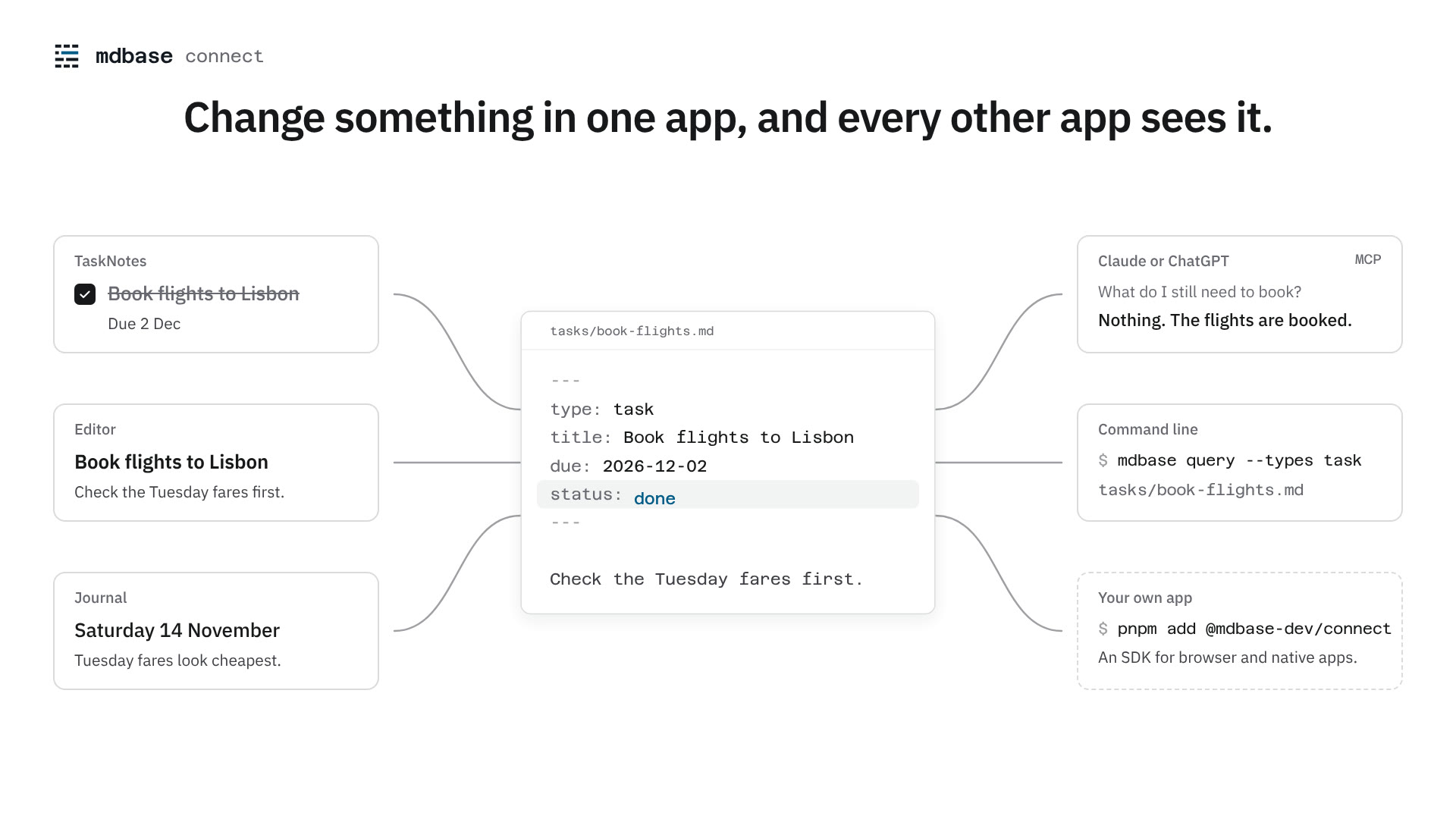
mdbase connect lets the applications and AI agents you choose work with your Markdown notes without handing them your whole folder or account. Your notes stay ordinary Markdown files with YAML frontmatter, a standard mdbase collection, instead of moving into an application's database. An application gets access to one collection only after you approve the exact operations it can perform, and you can pause or revoke that access at any time.
- Connect web, desktop, and mobile applications, Obsidian, and MCP clients such as Claude and ChatGPT to local, Private (E2E), or Cloud copy collections using one authorization model.
- Review concrete permissions, such as reading, querying, creating, or updating records, before granting access.
- Sync a collection to a folder on each of your computers and keep using any Markdown tool alongside connected applications.
- Keep local collection folders private and serve remote requests over Noise-encrypted pipes without opening an inbound port on your computer.
- Pause an application or revoke its access at any time.
- Read, query, validate, and write collections from the
mdbasecommand line. - Build your own application with the
@mdbase-dev/sdkSDK.
All mdbase collection semantics live in one deterministic Rust runtime
(runtime/, see runtime/README.md):
- Desktop daemon & CLI (
mdbn-daemon): runs on your computer, hosts one replica per registered folder over the native filesystem and SQLite index, serves local apps over IPC, and holds the Noise relay connection for remote clients. Your local folder paths never leave your computer. - Blind shared log (
mdbn-log-service): stores encrypted, signed log items and blobs without interpreting Markdown records. - Hosted replica (
mdbn-hosted-worker): runs the same portable Rust engine compiled to WebAssembly inside a Cloudflare Durable Object for Cloud copy collections, serving web and mobile apps directly over Noise pipes. - Control plane & relay (
services/server): handles accounts, pairing, application identity, grant policy, log/route discovery, and transient relay transport without persisting collection payloads.
- Local only: lives in a folder on your computer with no cloud log.
- Private (end-to-end encrypted): collection keys stay on your devices and sync through the blind log. Web applications and agents reach it through an online computer over a Noise pipe.
- Cloud copy (the default): syncs through the same log with the hosted Worker replica enrolled so web applications and AI agents can read and write even when your computers are offline.
Applications use the same approval model whichever way a collection is served, so changing modes does not give an application broader access.
- Create a free account at connect.mdbase.dev.
- Create a collection in the editor, or install the desktop app to sync a collection with a folder on your computer, including a folder of Markdown you already have.
- In a compatible application, choose Connect collection and review the requested access before approving it.
The editor's Connect workspace is the main web place to manage collections, connected applications, computers, and account sessions. The desktop app owns folder and sync settings. The Connect portal handles sign-in, pairing, recovery, and authorization transactions.
The managed MCP endpoint is:
https://mcp.mdbase.dev/mcp
Add it as a remote or custom MCP connector in an OAuth-capable client. Each collection receives an independent grant. See the MCP gateway guide for supported tools and trust boundaries, and ChatGPT and Codex plugin or Claude plugin for plugin packages.
New web and TypeScript applications should use @mdbase-dev/sdk
(runtime/packages/sdk), the native SDK for the mdbase-next runtime:
pnpm add @mdbase-dev/sdk@mdbase-dev/sdk handles collection sign-in and selection, Noise-encrypted
sessions to desktop and hosted replicas, typed record CRUD, CEL queries, live
subscriptions, file uploads, type and contract setup, and local-first work
before connecting. See apps/editor/NEW_SDK.md for an
end-to-end first-party consumer reference.
- Each grant binds one application, one collection, and an explicit set of operations and file scopes.
- The local daemon enforces grants on the computer that owns a local collection; local paths never leave the device.
- Application sessions to desktop and hosted replicas are Noise IK encrypted end-to-end; the relay sees routing metadata and ciphertext sizes, not record contents.
- Private collections keep decryption keys on your devices only; Cloud copy collections wrap hosted custody keys with AWS KMS.
The MCP gateway is an authorized application endpoint: it decrypts responses in memory so it can return them to the MCP client, but does not persist record payloads or operation results.
For the detailed design, see Architecture, the runtime overview, its contracts, and Encryption. Security assumptions, abuse cases, and prerelease residual risks are collected in the Threat model. The source and test map for independent review is the explicitly unaudited Security audit preparation package. Report suspected vulnerabilities privately via SECURITY.md.
The desktop app includes the mdbase CLI and background daemon (mdbn-daemon),
also published as a standalone headless archive for Linux, macOS, and Windows:
mdbase status
mdbase collection add /path/to/notes
mdbase sync enable notes
mdbase query --types task --where 'status == "open"'
mdbase read tasks/review.md
mdbase update tasks/review.md --fields '{"status": "done"}'
mdbase validate -c notes
See the headless installation guide and CLI and daemon guide for service management and command details.
See CHANGELOG.md for release history. Contributors add change
fragments under changelog.d/ rather than editing CHANGELOG.md directly.
This repository contains the mdbase-next Rust/WASM runtime and @mdbase-dev/sdk
(runtime/), the control plane and relay (services/server), the Connect
portal (apps/portal), the desktop app (apps/desktop), the Markdown editor
(apps/editor), the hosted MCP gateway (services/mcp), and shared protocols
(packages/protocol).
See Contributing for change fragments, the architecture check, generated-file rebases, and release versioning.
Development requires Rust (runtime/rust-toolchain.toml), Node.js 24 LTS, and
pnpm 11.15.1:
pnpm install
pnpm build
pnpm typecheck
pnpm test
pnpm ci:local
Inside runtime/:
cd runtime
cargo xtask arch
cargo test --workspace
End-to-end suites:
pnpm e2e
pnpm e2e:relay
See Contributing, Documentation map, Testing, Maintainability, and Releasing.