
Skip to content
View confuserdotcom's full-sized avatar

Block or report confuserdotcom

Block user

Prevent this user from interacting with your repositories and sending you notifications. Learn more about blocking users.

You must be logged in to block users.

Content in all repositories owned by your account will be closed.
Maximum 250 characters. Please don’t include any personal information such as legal names or email addresses. This note will only be visible to you.
Report abuse

Contact GitHub support about this user’s behavior. Learn more about reporting abuse.

Report abuse
confuserdotcom/README.md

Maths undergrad and olympiad trainee. I take my notes in Obsidian with Vim keys and LaTeX, and I build the tools I need along the way.

tock

tock records what you work on, on a Mac or on Linux under Hyprland, and labels it with rules you write. You never start a timer, and your data stays on your machine. Docs · brew tap confuserdotcom/tock && brew install tock
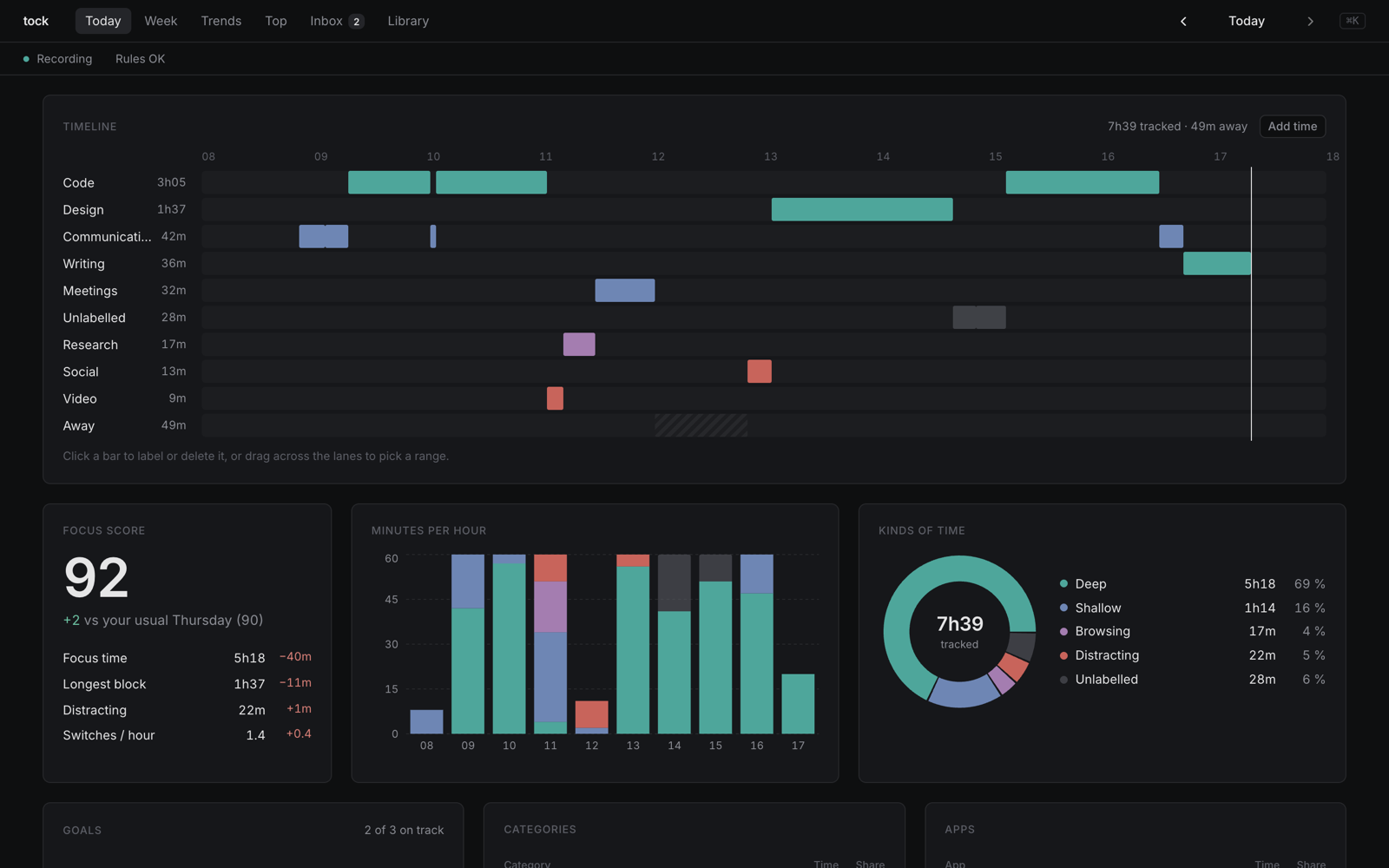
The tock dashboard: a timeline per category, a focus score against your usual day, minutes per hour and a donut of the kinds of time.

Obsidian plugins

  • flash-jump: flash.nvim-style jumps in Vim mode, even inside rendered maths.
  • latex-objects: Vim text objects, jumps and edits for LaTeX.
  • pdf-zathura: zathura's keys in the PDF view.
  • vim-extras: spelling keys, screen-row numbers, Ctrl-N / Ctrl-P in menus.

Other

  • ilhop: one key hops pointer and keyboard between a Hyprland box and a Mac.

Pinned Loading

  1. tock tock Public

    Local time tracker for macOS and Linux. Records what you work on, labels it with your rules. No timer, no cloud.

    Go

  2. obsidian-latex-objects obsidian-latex-objects Public

    Vim text objects, jumps and edits for LaTeX in Obsidian: maths, environments, brackets, commands, scripts, matrix cells

    JavaScript 1

  3. obsidian-pdf-zathura obsidian-pdf-zathura Public

    Obsidian plugin: zathura's keys in the PDF view. J/K pages, gg/G, zoom, marks, search, dark recolor, status bar, last-page memory.

    JavaScript

  4. obsidian-vim-extras obsidian-vim-extras Public

    Obsidian plugin: Vim spelling keys (]s [s z= zg zw), screen-row numbers that count what gj/gk move by, Ctrl-N / Ctrl-P in menus.

    JavaScript

  5. obsidian-flash-jump obsidian-flash-jump Public

    Obsidian plugin: flash.nvim-style jumps in Vim mode. Press s, type two letters, hit the label, even inside rendered LaTeX maths.

    JavaScript

  6. ilhop ilhop Public

    One key hops pointer + keyboard between a Linux (Hyprland) box and a Mac over input-leap on Wayland

    Shell