

A runnable local prototype using entirely invented manufacturing data. Choose a due-date range, identify delayed work orders, inspect their completion evidence, and watch validation catch a join that inflates the count. Preview a synthetic CSV, commit its orders and durable receipt together, then reopen that receipt after restart or verified database restore.
Built with Python's standard library, SQLite, and plain HTML/CSS/JavaScript. No package installation, account, hosted API, or employer system is needed.
Explore sample reports — no installation · Source ZIP v0.4.1 · Portfolio case study · Release notes
The browser sample uses actual frozen exports from the tested application. Filter orders, inspect source evidence and recorded SQL, compare before/after, or download a report. It is read-only: SQL execution, CSV imports and saving snapshots require the local Python application. See sample provenance and scope.
Watch the current 84-second import-history tour · MP4 · Captions · Transcript, capture disclosure and reproduction.
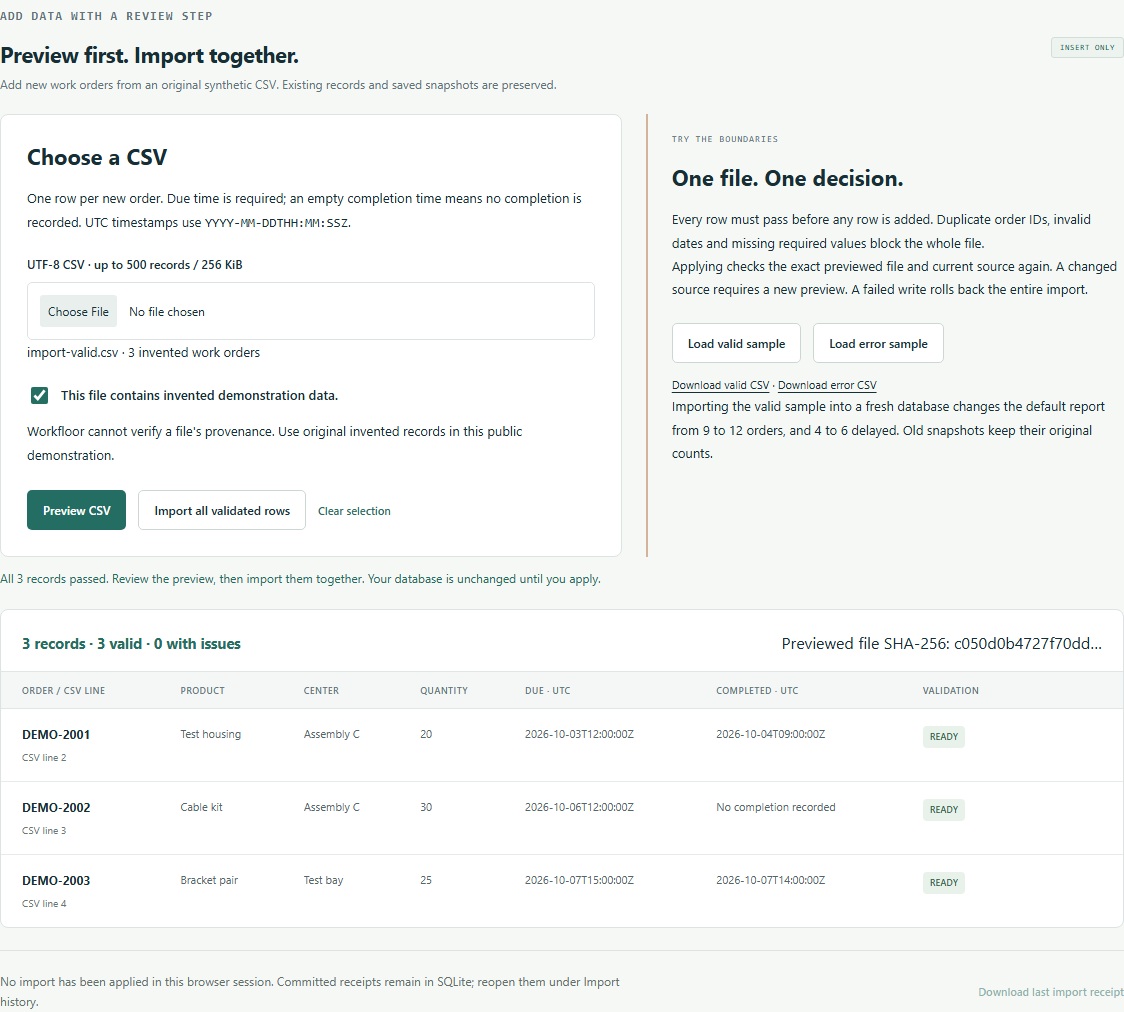
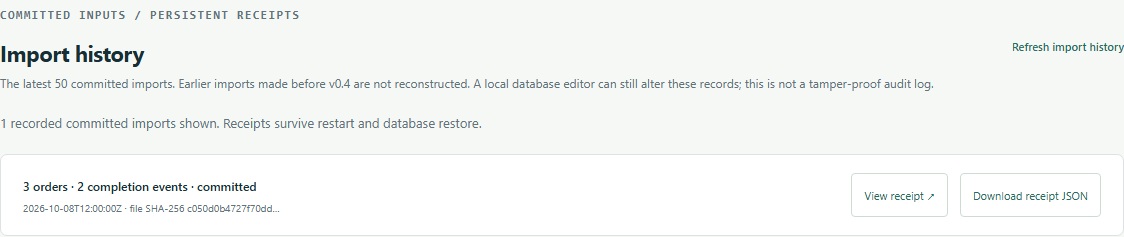
Actual v0.4.1 UI captures show CSV preview, persistent receipts, a real app-process restart and a verified database restore. Receipt downloads match at each checkpoint. Edited steps, no audio; fixed fictional receipt ID/time for repeatable captures. No runtime files or styles were changed for capture.
Earlier v0.1 reporting tour - 80 seconds · MP4 · Transcript and capture notes. Captioned steps from actual application captures, using synthetic data; edited timing and no audio.
Download portable Windows x64 — Python is included. Verify the ZIP against SHA256SUMS.txt, choose Extract All into a new local folder, then double-click Workfloor.cmd. The local report opens in your browser; no Python installation, pip, administrator rights or PATH change is needed. Keep the console open and press Ctrl+C there to stop.
Data persists outside the application under %LOCALAPPDATA%\Outlands\Workfloor\data. Relaunching reopens it; older source-download data is not moved or automatically upgraded. Offline first-run and recovery instructions · Package contents, licenses and validation limits · Public acceptance results.
The Windows portable download wraps unchanged v0.4.1 application source with the official CPython 3.14.10 runtime. Hosted Windows passed all 79 core tests and the bundled-process Chromium/import/restart/restore workflow. These checks establish runtime isolation; a manual Python-free-PC/Explorer test remains unperformed. The outer package is unsigned. The original source ZIP below remains available for other platforms and developers.
Requires Python 3.12 or newer with its standard sqlite3 module and a modern browser. Tested on Windows 11 with Python 3.12.7 and SQLite 3.45.3. The v0.4 CLI/HTTP, upgrade and recovery workflow is checked separately on Windows and Ubuntu with Python 3.12/3.13. Browser acceptance remains Windows-specific; macOS is unqualified.
Extract the ZIP, open a terminal in the extracted project folder, then run:
python app.pyOn Windows, start-workfloor.cmd is an alternative launcher. If port 8765 is occupied, use python app.py --port 0; open the exact loopback URL it prints. On a system where Python is named python3, use that executable after checking it is version 3.12+.
The first launch creates data/workfloor.sqlite3 with the invented fixture. Later launches reopen it. Stop with Ctrl+C. To choose a separate experiment, use python app.py --data-dir ./another-demo --port 0. An existing foreign database is refused rather than reset.
- Keep From date = 2026-10-01, Before date = 2026-10-08. The end date is exclusive; both bounds are UTC midnight.
- Run the report. Expect 9 orders / 365 units, 4 delayed (1 completed late + 3 open at cutoff), 2 needing review, and 3 completed on time.
- Change Show to Delayed. Inspect
WO-1002: its identical replay rows remain visible but are collapsed for classification. InspectWO-1011for conflicting timestamps, orWO-1004for a missing timestamp. - Compare Correct aggregation with Naïve join · wrong. The correct query matches a separate Python reference. The deliberate error counts 26 joined rows / 1,195 units, adding 17 rows to the actual 9-order cohort.
- Save a snapshot. Stop and restart using the same data directory, then open it under Saved snapshots. Its results, selected source evidence, parameters, dataset fingerprint and SQL text are preserved.
- Download the report as JSON if you want a portable result. It is a report export, not a complete database backup.
Try 2026-11-01 to 2026-11-02 for the empty state. Try an end earlier than the start for validation feedback. An empty or sparse range can fail to expose the bad join; the interface says so instead of calling that query correct.
- Save a snapshot of the default report first: 9 orders / 4 delayed.
- Open Import CSV and choose Load error sample → Preview CSV. Duplicate IDs, an invalid date and missing/invalid required values block the whole file. No rows are added.
- Choose Load valid sample → Preview CSV. Review all three invented orders, then select Import all validated rows.
- The default report becomes 12 orders / 440 units / 6 delayed / 2 needing review / 4 on time. The independent reference still matches. There are now 15 orders in the full source, including the three outside the default cohort.
- Open the earlier saved snapshot: it still shows 9 orders / 4 delayed. Return to the current query to see the imported data. Restarting with the same data directory preserves both.
You can also choose a UTF-8 CSV file, confirm it contains invented data, and preview it. Imports are limited to 500 records / 256 KiB, with one row per new order. Every row must pass; there are no partial imports, updates or deletes. A changed file/source requires a new preview; a failed write rolls back the whole transaction.
CSV format, failure behavior and actual workflow · Valid sample · Intentional errors
After importing, open Import history to inspect or download the stored receipt. Its file hash, affected IDs, counts and source fingerprints persist with the orders. The most recent 50 entries are listed; older receipts remain stored. Failed imports leave neither orders nor a receipt. This is local history, not a signed audit log.
Fresh databases use schema 2. Existing schema-1 databases are refused at startup until you explicitly stop the app and run:
python migrate.py --data-dir ABSOLUTE_EXISTING_DATA_DIR --backup-dir ABSOLUTE_NEW_BACKUP_DIR
Use absolute paths with existing parents. The upgrade first creates and verifies a schema-1 backup, then preserves all four original tables while adding an empty receipt table. Earlier import receipts are not reconstructed. Keep the backup private. See upgrade commands, refusals and recovery.
Keep original databases and backups private. Use fully spelled absolute paths with existing parents; choose new backup/restore directories outside the input. Stop all Workfloor instances before running maintenance:
python recovery.py backup --data-dir ABSOLUTE_EXISTING_DATA_DIR --output ABSOLUTE_NEW_BACKUP_DIR
python recovery.py verify --backup ABSOLUTE_BACKUP_DIR
python recovery.py restore --backup ABSOLUTE_BACKUP_DIR --data-dir ABSOLUTE_NEW_RESTORED_DATA_DIR
python app.py --data-dir ABSOLUTE_RESTORED_DATA_DIR --port 0
Replace the uppercase placeholders. Reopen the local report and saved snapshots. Changed backups and existing destinations are refused. This restores a complete SQLite snapshot; it does not undo an import in place or restore CSV/download files. Requirements, recovery examples and limits.
A developer or reporting reviewer who wants to inspect an operational report's definition, source grain, date boundaries and uncertainty. This example makes one narrow workflow reproducible; it does not forecast production or control equipment.
Connor O'Shea selected the manufacturing/reporting problem and requested the initial scope: a date-range workflow, parameterized SQL, a deliberate join error, persistent data, and a reproducible handoff. Connor subsequently specified CSV preview, safe imports and preservation of existing records for v0.2, then approved verified database backup/restore and a public recovery case for v0.3, followed by persistent import history and a backed-up schema upgrade for v0.4. The prototype's code, interface, invented fixtures, tests and documentation were implemented with Codex assistance during these builds. The specific reporting policy and tradeoffs are documented for review in DECISIONS.md.
All orders, products, work centers, process steps and events were invented for this project. This is an original public demonstration, with no employer code, schema, records or operational deployment represented.
The grain is one work order. The cohort contains orders whose due time is at or after the start and strictly before the end. Completion events must occur strictly before that same end cutoff.
| Evidence | Classification |
|---|---|
| Earliest usable completion at or before due time | Completed on time |
| Earliest usable completion after due time | Completed late |
| No usable completion before cutoff | Open at cutoff; included in delayed |
| Same source event ID has conflicting timestamps | Needs review; no timing conclusion |
| An undated completion record | Needs review; no timing conclusion |
| No due timestamp | Excluded from due-date cohorts; separately disclosed |
Replay identity is (order_id, source_event_id). Identical copies collapse; different timestamp variants are quarantined from completion selection. A conflict takes precedence over a missing timestamp. Planned steps are illustrative routing rows, not evidence that a step was completed.
- Schema: three source tables, a saved-report table and a committed-import receipt table.
- Correct report: group source events, reduce evidence to one row per order, then join aggregated process steps.
- Deliberately wrong query: two direct one-to-many joins multiply rows.
- Procedural reference: Python datetime comparisons and grouping, without reusing the report SQL. Tests also assert a manually specified result table.
Dates are bound separately using named SQLite parameters, following the Python sqlite3 guidance. There is no arbitrary SQL execution field.
SQLite stores the synthetic source, saved reports and committed import receipts. Saving recomputes the report in a transaction, checks it against the reference, and compares the dataset fingerprint with the version the browser loaded. A changed source returns a conflict and asks for reload; an insert failure rolls back. Existing snapshots remain available. The browser's source inspector does not edit source rows.
Snapshots freeze a report response; the UI offers no update or delete action. A person with local database access can still alter it. The SHA-256 fingerprint identifies the three source tables and is not a signature or authentication mechanism.
For recovery after an interrupted run, restart with the same --data-dir. v0.3 adds verified offline database backup and fresh-directory restore. Stop the app first, choose a new backup directory, verify it, and restore into a different new data directory. Restore never overwrites a destination. Schema upgrades are a separate explicit, backed-up command; historical releases remain unchanged. The OS releases the persistent ownership guard when the process exits; never delete an active guard.
v0.4 local prototype - durable import history and explicit backed-up upgrade. The new synthetic upgrade/import case checks 10 CLI/HTTP conditions: a verified v1 backup, preservation of original table values, atomic receipt storage, exact receipt bytes after server restart, a separate Python process and database restore, and complete rollback when receipt insertion fails. The v0.3.1 recovery receipt remains historical. Current package checks repeat the recovery workflow against all five current tables. See fresh-download CI. Earlier media and browser exports retain their v0.2 scope. See actual validation and limitations, design decisions, v0.2 machine-readable verification, and the example report.
python -m unittest discover -s tests -v
python app.py --demo-report --data-dir ./cli-demo
The CLI emits the same JSON report used by the interface. Tests create and remove their own .test-tmp/case-* directories inside this checkout. They use synthetic data and actual SQLite/HTTP operations.
Verify Workfloor runs on every push and pull request, and can also be started manually. Its Windows job sets up Python 3.12, records runtime versions, runs the current backend/recovery suite (including the original 39 cases), exercises both command-line entry points against separate fresh databases, and runs three Chromium browser tests. The entry-point check runs outside the project working directory with spaces in the data paths; both reports must match the expected totals, independent reference and deliberate 26-versus-9 join error.
The application browser test saves a baseline, blocks an invalid CSV, checks changed-file invalidation, imports the valid sample, verifies the downloaded receipt, saves the 12-order result, reloads and downloads the preserved 9-order snapshot byte for byte. A new test downloads the persisted receipt after server restart and database restore. The read-only viewer test checks, frozen-export hashes, filters, evidence dialog, SQL tabs, report download and phone widths. Browser verification records are retained for 14 days; failures also retain a screenshot and an action trace without network/DOM snapshots. See browser checks and diagnostics for reproduction and limits, and Actions for each commit's hosted result.
To repeat the entry-point check from a current source checkout on Windows:
python scripts/verify_entry_points.pyBrowser testing has separate, hash-locked developer dependencies. The local application still uses only Python's standard library. These browser tools and the static sample viewer are available in the current source checkout; the original v0.2.0 release ZIP and tag remain unchanged.
This is a single-user, loopback-only local application. It supports only the bounded, insert-only CSV format described above. It has no MES connection, user accounts, roles, production scheduling, shift calendar, rework/reopening model, partial completion accounting, or general-purpose schema migration. Only the explicit Workfloor schema-1 to schema-2 upgrade is supported. It is not an official production report or a medical-device tool.
The cutoff is an event-time view over the current dataset, not a reconstruction of what was known historically. New committed imports have receipt times; earlier ingestion history is not reconstructed, and the report does not implement ingestion-time queries. Missing/conflicting evidence is a review case, not proof of a cause, completed quantity, or actual operator activity. The report does not infer capacity or root cause.
macOS execution, public hosting, multi-user use, accessibility conformance, penetration testing, large datasets, crash/power-loss recovery and long-term maintenance are unqualified. The UI shows up to 50 recent snapshots; older snapshots remain in SQLite. A snapshot is not a backup or a tamper-evident audit log.
License: MIT. This repository contains the v0.4.1 source. The original v0.1.0 release remains available with its original files and recorded validation; the CSV workflow was added in v0.2.0. See release provenance.
The root MANIFEST-SHA256.json and RELEASE-CHECKSUMS.txt are historical v0.2 records. The v0.4 ZIP uses its generated SOURCE-MANIFEST.json and attached release receipt/checksums.