
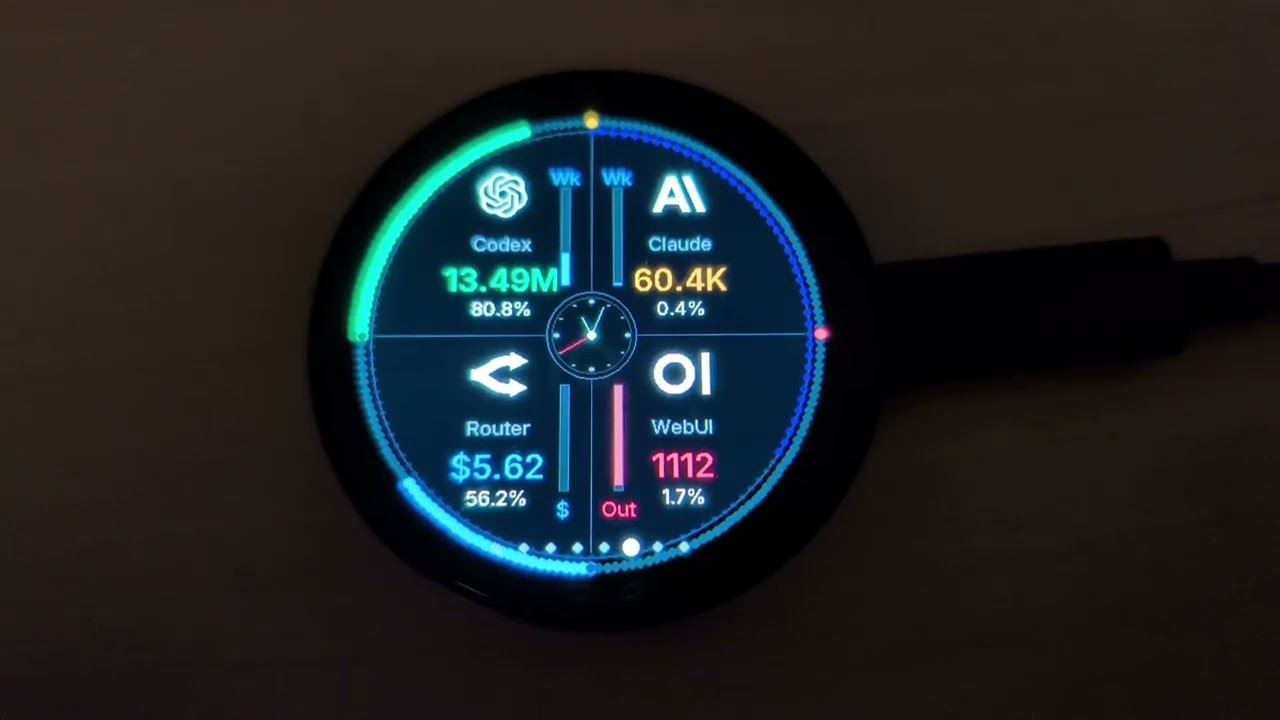
Project version: 0.10.0
Token Tracker collects personal AI usage — Codex, Claude Code, OpenRouter and rtk — into Home Assistant, where a small round ESPHome display shows it on the wall.
This repo is the data pipeline only. It gathers the numbers and publishes them to Home Assistant over MQTT discovery. The physical display is an ESPHome device that lives in its own repository (see The display below) — the two were split so the device config has exactly one home and cannot drift out of sync with the hardware again.
It is built around my own environment, but the structure can be reused if you swap out the entity IDs, MQTT settings and API secrets.
python-collector/- a standalone Python script, run periodically by an external scheduler (e.g. a Windows Scheduled Task every minute). Reads the local Codex and Claude Code session logs, queries Anthropic's usage endpoint for the real Claude rate limits, runsrtk gainfor the savings numbers, and publishes the lot over MQTT discovery. It renews the Claude OAuth token itself when it is about to expire, so it stays headless instead of needing someone to open the CLI every few hours.homeassistant/packages/tokentracker/- Home Assistant package that polls OpenRouter over REST.
- Project:
0.10.0(VERSION) - Home Assistant package:
1.2.1 - Python collector:
1.4.0
See HISTORY.md for the change log.
See INSTALL.md for a step-by-step installation from an empty Home Assistant
environment.
The collector is intentionally "raw-only": it publishes counters and lets the display compute maxima, remaining amounts and percentages.
| Source | HA entity | Responsibility |
|---|---|---|
| Codex | sensor.tokentracker_codex_tokens_week |
The collector reads local Codex sessions/SQLite and publishes weekly tokens via MQTT |
| Claude Code | sensor.tokentracker_claude_code_tokens_week |
The collector reads local Claude JSONL logs and publishes weekly tokens via MQTT |
| Claude limits | sensor.tokentracker_claude_code_5h_used_percent |
The Python collector queries GET /api/oauth/usage for the real subscription rate limits |
| OpenRouter | sensor.openrouter_balance_remaining, sensor.openrouter_usage_percent |
The HA REST package fetches account credits and usage from OpenRouter |
| rtk | sensor.tokentracker_rtk_saved_tokens_total and ten more tokentracker_rtk_* |
The Python collector runs rtk gain --all --format json and publishes the savings summary |
| Collector health | sensor.tokentracker_status, sensor.tokentracker_problem, sensor.tokentracker_problem_count |
The collector reports on itself, so a frozen number is distinguishable from a healthy one |
For Codex the collector also forwards the live rate_limits block from the
rollout sessions, plus plan_type. Which window lands in which slot depends on
the plan, so the collector classifies each by its own window_minutes rather
than by position: an individual plan sends the 5h window as primary and the
weekly as secondary, but a team plan sends a single weekly window as
primary and leaves secondary null. Reading by position put team weekly
usage in the 5h sensor and left the weekly sensor at 0. On a team plan
codex_5h_* is legitimately 0 — there is no such window — so a consumer should
check plan_type before showing it. Claude's equivalent comes from the
authenticated /api/oauth/usage endpoint, which is the same source Claude Code
itself uses.
sensor.tokentracker_status is ok, degraded or error.
sensor.tokentracker_problem is the text to show — it names the remediation,
not just the symptom (Claude login lost: run claude then /login), with errors
ordered ahead of warnings and the whole thing capped at Home Assistant's 255
character state limit. It reads OK when nothing is wrong, never an empty
string, since empty would arrive as unknown and look identical to a collector
that never ran.
The text is reduced to the glyph set the ESPHome display builds its fonts with
(see DISPLAY_GLYPHS in collector.py). A character outside that set renders as
nothing on the device and would silently eat part of the message, so if you
change the display's glyphs: line, change that constant to match.
claude_tokens_week deliberately excludes cache-read tokens: they dwarf
everything else (often >95% of the raw sum) and are billed at roughly 0.1x, so
including them at full weight would make the headline total useless as a gauge.
Cache reads still get their own sensor.
Home Assistant builds these entity IDs from the device name plus the sensor's
friendly name, not from the MQTT object_id. That is why, for example, the
sensor whose object_id is tokentracker_rtk_input_tokens_total appears as
sensor.tokentracker_rtk_raw_tokens_total — the name is "RTK Raw Tokens Total".
When adding a sensor, check the real entity ID in Home Assistant before pointing
anything at it, rather than assuming it matches the object_id.
The ESPHome device is not in this repo. It is
storstugan-office-token-tracker-128.yaml in my private ESPHome repository,
built and flashed with the toolchain that lives there.
Current hardware: Waveshare ESP32-S3-Touch-LCD-1.28 — a round 240x240 GC9A01 LCD with CST816 touch and a QMI8658 IMU. It shows a clock, one screen each for Codex, Claude Code, OpenRouter and rtk, and an overview split into four quarters (Codex, Claude, OpenRouter, rtk). Swipe to page, tap a tile on the overview to jump to it.
An earlier 466x466 AMOLED version (Waveshare ESP32-S3 Touch AMOLED 1.75) used to
live in this repo under esphome/. That screen has been repurposed and the
config was removed in 0.7.0; it is still in the git history if you want it.
Anything the display needs from this repo is just the MQTT sensors above — if you build your own display, those entity IDs are the contract.
Copy homeassistant/packages/tokentracker/ to:
/config/packages/tokentracker/
Make sure configuration.yaml loads packages:
homeassistant:
  packages: !include_dir_named packages
Details about secrets, endpoints and sensors are in
homeassistant/packages/tokentracker/README.md.
The script is in python-collector/. It does one publish cycle and exits, so it
needs an external scheduler to call it repeatedly — there is no long-lived host
process. It reads the session logs Codex and Claude Code write anyway, so it
works whether those run via a CLI, a desktop app, or an editor.
See python-collector/README.md for setup, including the exact schtasks
command to schedule it on Windows.
A VS Code extension used to be the alternative collector. It was removed in
0.7.0: it had stopped being installed, never gained the rtk or Claude
rate-limit sensors, and its MQTT device name (TokenTracker VS Code) produced a
second, conflicting set of ..._vs_code_* entity IDs. It is in the git history.
If rtk is on PATH, the Python collector adds
its savings numbers to every publish cycle and the display's rtk screen fills
in. Nothing needs configuring — the collector detects rtk itself and omits the
sensors entirely when it is not installed. Set "rtk_enabled": false in
config.json to skip it anyway, or "rtk_command" to point at a binary that
is not on PATH.
This repo should not contain real API keys or tokens. Local files such as
.ai-tokens, .ha-token and python-collector/config.json (which holds the
real MQTT password) are listed in .gitignore.
If this is published, it should be described as an example project or a reference implementation. Anyone else using it will at least need to change:
- Home Assistant entity IDs.
- MQTT broker and credentials.
- OpenRouter secrets.