


You can watch our project's demo video on YouTube to get a quick overview of how it works.
You can access the live website by clicking the link below:
- Project Goal
- Introduction
- Key Features
- Selected Approach
- Getting Started
- Testing
- User Guide
- License
- Contributing
- Team Information
Our web application aims to foster active citizen participation in the state/municipality budget voting process, ensuring alignment with the will of the people. We seek to address the lack of influence and disconnection that citizens often feel regarding how their taxes are utilized. Through our intuitive and transparent platform, we empower individuals to have a direct impact on budget decisions.
Are you tired of feeling like your voice doesn't matter when it comes to budget decisions? Do you want to have a say in how your taxes are spent? Look no further! The People's Budget web application is here to revolutionize citizen participation. With our platform, you can actively engage in the voting process for state and municipal budgets, making your opinions count. We believe in the power of collective decision-making and strive to create a more inclusive and democratic society.
- Online Voting for Budget Proposals: Our web application allows users to vote online for the budget proposal.
- Revoting Capability for Updated Decisions: Our system enables users to revise their votes accordingly.
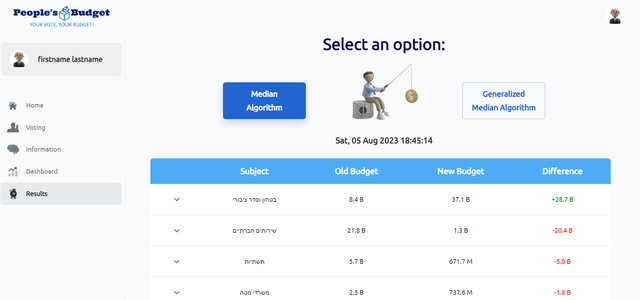
- Real-time Result Tracking for Transparency: Transparency is crucial to us. We provide real-time tracking of voting results, allowing citizens to stay informed about the progress and outcomes of budget decisions.
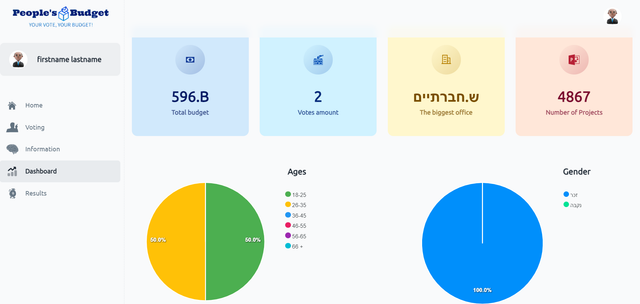
- Comprehensive Voter Statistics Dashboard: To encourage informed participation, we offer a comprehensive voter statistics dashboard. It provides insights into the overall voting trends, demographics, and other relevant data.
To ensure modularity, scalability, and maintainability, we adopted a layered architecture approach. The system consists of three essential components: the presentation layer (client), the application layer (server), and the data layer (database).
To facilitate seamless communication between the client and server, we employ a client-server pattern with RESTful APIs. This architecture enables efficient data exchange and supports a smooth user experience. Additionally, we utilize the strategy pattern to ensure flexible interaction between the server and database. The system architecture is robust and scalable, with clear component separation for easier maintenance and future enhancements.
- Client: The client-side of our application is built using JavaScript and the React library. This choice ensures an optimal user experience, with responsive and interactive interfaces.
- Server: The server-side logic and information services are implemented using Python and the Flask library. This combination allows for efficient processing and handling of requests.
- Database: We utilize MySQL as the database management system, providing robust and reliable storage for our application data.
Our web application incorporates powerful algorithms to guarantee fairness, truth-telling, Pareto-efficient, and anonymity in the voting process. These algorithms are designed to ensure that every vote is counted accurately and that user privacy is protected.
User experience and user interface design are essential aspects of our project. We prioritize simplicity and ease of use, ensuring that citizens of all technical backgrounds can navigate the application effortlessly. Our design philosophy revolves around creating an intuitive interface that encourages active participation. We also provide a Guest Mode that allows users to explore the system before signing up.
To run the People's Budget web application, you need to have the following installed on your system:
- MySql (8.1.0)
- Python (3.11.0)
- Node.js (18.13.0)
To set up the People's Budget application locally, follow the steps below for both the Client and Server components:
- Clone the repository:
git clone https://github.com/ElhaiMansbach/Final-Project - Navigate to the server directory:
cd Final-Project/src/server - Install the required Python dependencies:
pip install -r requirements.txt - Set up the necessary environment variables.
- Create an '.env' file: Use the '.env.example' file in the server directory as a template.
cp .env.example .env - Edit the '.env' file: Open the '.env' file you've just created and modify the values if necessary.
- Install MySQL server and client packages:
sudo apt install mysql-server mysql-client - To initialize the database, navigate to the database directory and run the command:
python3 sql_Initialization.py - Navigate back to the server directory and start the server by running the command:
python3 app.py
- On a new terminal, navigate to the client directory:
cd src/client - Install the required npm dependencies:
npm install - Set up the necessary environment variables.
- Create an '.env' file: Use the '.env.example' file in the client directory as a template.
cp .env.example .env - Edit the '.env' file: Open the '.env' file you've just created and modify the values if necessary.
- Start the client by running the command:
npm start - The web browser will automatically initiate the client-side application.
- You're ready to actively participate in the budget voting process!
The project includes a dedicated test directory with subdirectories for client and server tests. These tests are designed to ensure the functionality and reliability of the application components.
To execute the tests, follow these steps:
-
Client Tests:
- Navigate to the
test/clientdirectory. - Install the required npm dependencies by running the command:
npm install
- Download and install a ChromeDriver that corresponds to your browser from here.
- Run the command to execute the client-side tests:
npm run tests
This command will run all the tests.
To run a specific test, use the following command, replacing
"test name"with the desired test name:node RunAllTests.js "test name" - Navigate to the
-
Server Tests: Navigate to the
test/serverdirectory and run the command to execute the server-side tests:pytest
-
Accessing the Web Application: Open your web browser and enter the URL of the People's Budget application.
-
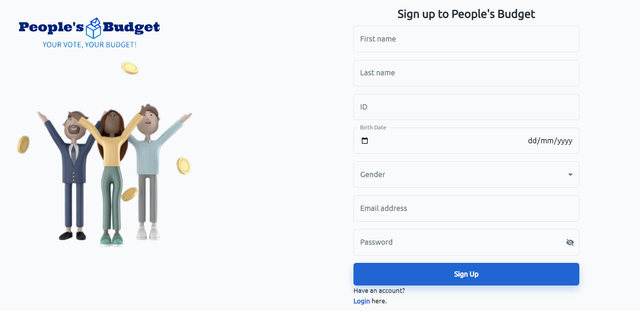
Creating an Account: Click on the "Sign Up" button and follow the on-screen instructions to create your account.
-
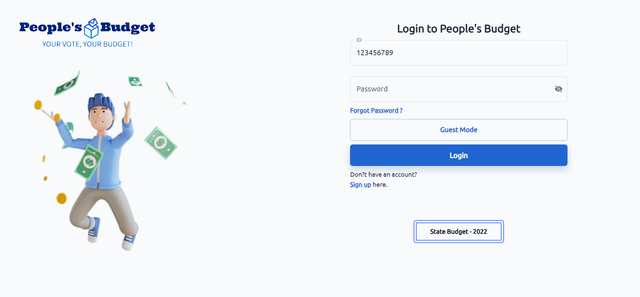
Logging In: After creating your account, click on the "Log In" button and enter your credentials to access the system.
-
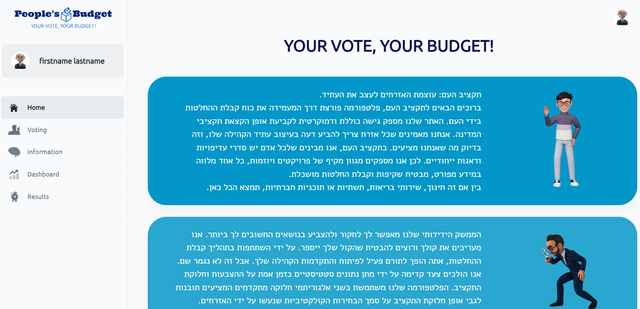
Home page: Upon logging in, you will be redirected to the home page. This page provides information about the system.
-
Voting: You can easily modify the budget as per your preferences by casting your vote for a budget proposal. To vote, simply click on the "Vote" button at the bottom of the page and confirm your selection when prompted.
-
Result Tracking: You can monitor the progress and outcome of the budget vote in real-time by accessing the "Results" section. Our sophisticated algorithms calculate and present visualizations and updates on the voting process.
-
Dashboard: Explore our comprehensive voter statistics dashboard to gain valuable insights into voting trends, demographics, and other relevant data. Utilize this information to make informed decisions and gain a better understanding of overall participation patterns.
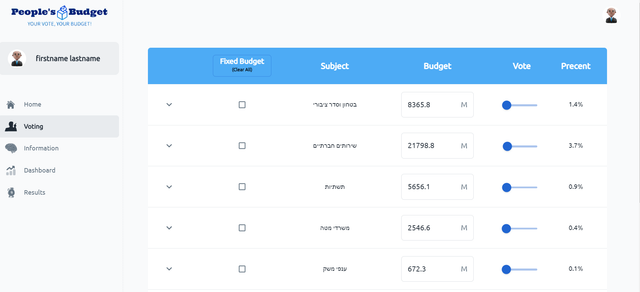
- Revoting: If you have already cast your vote but have since changed your mind, don't worry! Our system allows you to modify your vote by simply casting a new vote before the voting period ends.
- Guest Mode: Before signing up, we recommend exploring the system and familiarizing yourself with the features in Guest Mode. This allows you to preview the application's functionalities without the need to create an account.
This project is licensed under the Creative Commons Attribution-NonCommercial (CC BY-NC) License.
We welcome contributions to the People's Budget project! If you would like to contribute, please follow these guidelines:
- Fork the repository and create your branch from
main. - Make your desired changes and improvements to the codebase.
- Ensure that your code adheres to the project's coding style and conventions.
- Test your changes thoroughly to ensure they function as intended.
- Commit your changes with clear and descriptive commit messages.
- Push your changes to your forked repository.
- Submit a pull request, detailing the changes you have made.
We will review the pull request and provide feedback or merge it into the main codebase if appropriate. We appreciate your contributions and look forward to collaborating with you!
Please note that by contributing to this project, you agree to license your contributions under the Creative Commons Attribution-NonCommercial (CC BY-NC) License. Your contributions must align with the license terms and restrictions.
If you have any questions or need further assistance with the contribution process, feel free to reach out to us.
This project was developed by:
 Elhai Mansbach |
 Ofir Ovadia |
 Lioz Akirav |