
Local-first voice dictation for OpenCode (v2).
Press F9, speak, press F9 again — your words appear as an editable
draft in the chat you recorded from. Submit sends, esc discards, dictating
again extends the draft. If anything goes wrong, ctrl+f9 brings your
last take back (see Recovery).
Status: early release (0.x). Linux only, tested mainly with PipeWire. Expect rough edges; see Current limitations.
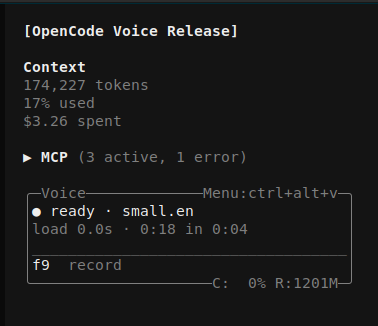
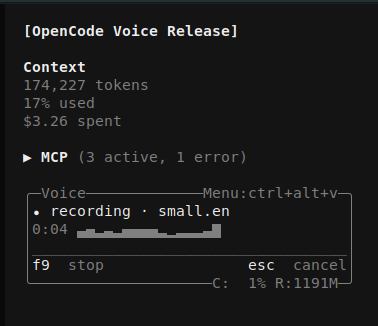
This plugin is built around one rule: nothing you say ever leaves your computer. Whisper runs locally, in-process, via sherpa-onnx. There are no cloud speech APIs, no accounts, no API keys, no telemetry, and no server of mine or anyone else's involved in transcription.
The plugin talks to the network in three cases, and none of them carries audio or transcript text:
- opening the model manager fetches the list of available whisper models from k2-fsa's release page
- confirming a download fetches that model file
- once per day, unless disabled under Behavior, it fetches this package's public npm metadata to check for a newer version; it only informs you and never installs an update
After a model is installed the plugin works fully offline (disable the optional update check to make no automatic request), on air-gapped machines and on confidential codebases. See Data & privacy for exactly what is stored on disk.
A remote transcription backend may be added in a future version. If it is, it will be opt-in and off by default. Local stays the default.
- Local and offline transcription — speech processing never uses the network; model downloads are explicit and the metadata-only update check is optional
- Push-to-talk (F9 by default) with a live level meter in the sidebar panel
- Proofread-before-send: transcripts arrive as a prefilled form — edit, submit, or discard; a new take extends the open draft
- Model manager: curated whisper models (tiny → medium, English and multilingual), downloaded on demand, switchable any time
- Voice activity detection: pauses become line breaks, silence is never decoded
- Noise-annotation filter: whisper artifacts like
(buzzing)or[BLANK_AUDIO]are dropped before they reach your chat - Loss-resistant safety net: audio is kept until its draft is safely stored, and the draft until it is submitted; one key recovers either after a failure or crash
- Settings-first design: shortcuts, language, VAD tuning, model RAM
residency, and meter style all live in one menu (
ctrl+alt+v) - Update awareness: the panel shows the installed version and marks an available release; each new release is announced once, never auto-installed
- Multi-terminal safe: transcripts land only in the terminal that recorded them
Version 0.0.7 is dedicated to update awareness and release notes. The panel
shows the installed Voice version, and the plugin can announce newer published
versions with their complete release notes. It never installs updates; use
OpenCode's normal plugin updater when you choose, for example:
opencode plugin update @juliuskb/opencode-voiceAutomatic checks happen at launch at most once per day. Check for updates can be disabled under Behavior; this stops automatic checks, indicators, and release notifications. A manual Check for updates now action remains available. Re-enabling automatic checks clears the cached update state and starts fresh. Failed offline checks may retry on a later launch after the backoff period.
- Linux (macOS/Windows planned). Audio capture requires
pw-record(PipeWire),arecord(ALSA), orffmpeg; archive extraction requirestarwith bzip2 support. These are already present on most distributions. - OpenCode v2.0.31 or newer. The plugin runs inside OpenCode's bundled Bun runtime; each release is tested against supported current OpenCode versions.
- ~110 MB–1.9 GB disk per model (downloaded on first run, your choice of size).
Transcription runs on the CPU, and the bar is low. This plugin is developed
and used daily on a mid-range 2018 ultrabook: an Intel i5-8265U (4 cores,
8 threads) with 12 GB of RAM. Measured there with the recommended small.en
model on 6 threads:
small.en, i5-8265U, 6 threads |
|
|---|---|
| transcription time | 0.25 to 0.5 × the length of the take (a 20 s take comes back in 5 to 10 s) |
| model load, first take | 2 to 4 s, then kept in RAM (Behavior → Model residency) |
| memory while the model is loaded | about 0.8 GB, measured in isolation |
| memory after the model unloads | 0.35 to 0.45 GB stays with the allocator; repeated load/unload cycles do not grow it |
The R figure in the panel is the memory of the whole OpenCode server
process, not the plugin's share. Unload model from memory now in the
settings menu frees the model's part immediately.
Anything newer or with more cores is faster. On weaker hardware, base.en
or tiny.en trade some accuracy for speed; the model manager shows the
size of each. Thread count is a setting if you want to leave cores free.
More measurements will be added here as the plugin runs on more machines. If you have figures from yours, the model, CPU, and the transcription time for a take of known length are all it takes; open an issue with them.
GPU-accelerated transcription is not supported and is not planned until the CPU path is fully stable. It may come later.
Add the package to your opencode config (~/.config/opencode/opencode.json):
{
  "plugins": ["@juliuskb/opencode-voice"]
}
opencode installs it automatically on next start.
From source (development)
git clone https://github.com/JuliusKB/opencode-voice
cd opencode-voice && bun install
Then point your config at the directory:
{
  "plugins": ["/path/to/opencode-voice"]
}
Before opening a pull request, run the checks:
bun run check   # strict type check
bun test        # guard tests, including a compile check of the panel
bun run build   # compiles the panel to dist/tui.js (what npm users receive)
The local checkout runs the panel from source; the published package ships
it precompiled, because OpenCode compiles plugin files inside node_modules
differently and a source .tsx panel would render once and never update.
- Start opencode — the Voice panel appears in the sidebar showing "no model installed".
- Press F9 — the model manager opens. Pick one (
small.enis the recommended default for English;smallfor multilingual) and confirm the download. Progress shows in the panel. - When it's ready, press F9, speak, F9 again. Your transcript opens as a form: submit sends it to the chat, esc discards.
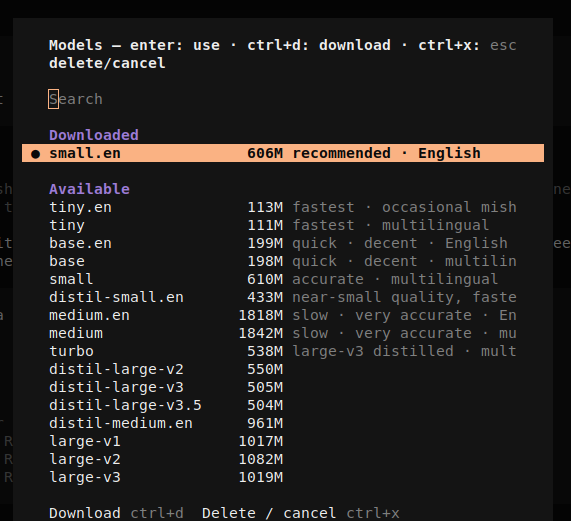
That's the entire setup.
| Key | Action |
|---|---|
F9 |
start / stop recording (configurable) |
esc while recording |
cancel the take |
ctrl+alt+v |
settings menu (configurable) |
ctrl+f9 |
restore a saved draft or retry a failed take (configurable) |
| command palette → "Restore last transcript" | same recovery action |
Your transcript arrives as a form in the chat. Edit it, then enter sends, esc discards:

Dictating while a draft form is open extends it (blank line between takes). Note: manual edits typed into the form are lost when a new take extends it — edit last, or submit between takes.
Nothing you dictate should be lost, even when something breaks. The plugin
keeps your last take on disk until it is safely in a draft, and the draft
until you submit it (details under Data & privacy).
ctrl+f9, or "Restore last transcript" in the command palette, brings
it back:
- after a failed transcription: re-transcribes the saved audio
- after a crash, a restart, or an accidental esc: re-raises the saved draft in the chat you are in
- if both exist: restores the draft, then appends the re-transcribed take
Press it whenever a recording or draft disappears. "Nothing to restore" means there was nothing on disk. The key is configurable under Shortcuts.
ctrl+alt+v opens the menu. The main page covers daily use:
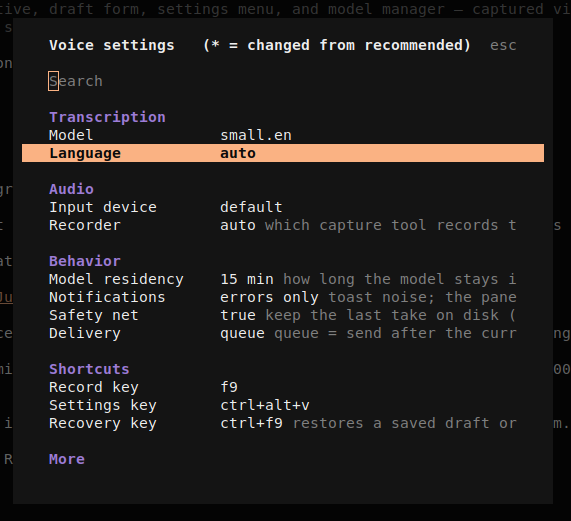
- Transcription — model (opens the model manager), language (for multilingual models; auto-detect by default)
- Audio — input device, capture tool (with per-machine availability)
- Behavior — model RAM residency, notification verbosity, the daily update check (on/off), the safety net, queue-vs-steer delivery
- Shortcuts — all key bindings
Advanced… holds the tuned-by-default knobs: decode chunking, VAD
sensitivity, level-meter style/size/rate, toast timings, debug logging.
Changed values are marked * with their recommended value shown; clearing a
field reverts to it; one action resets everything.
Everything lives in ~/.local/share/opencode-voice/:
models/— downloaded whisper models (from k2-fsa's GitHub releases)settings.json— your settingsupdates.json— cached public version metadata and the last release notice shown (never audio, transcripts, or machine identifiers)voice.log(+.prev) — plugin log, current and previous run. Never contains speech content or transcripts at any log level.last-take.wav/last-draft.txt— the safety net (on by default, Behavior → Safety net): your last take is kept on disk until it is assured delivered — the audio until transcription succeeds, then the draft text until you actually submit it. One slot, overwritten per take, deleted the moment delivery completes. If transcription fails or opencode crashes with a draft open, the restore key (ctrl+f9) recovers it: re-raises the saved draft, or re-transcribes the saved audio. Turning the setting off deletes both files (an active recording is removed as soon as the recorder releases it).
With the safety net enabled, audio is recorded directly to last-take.wav and
deleted only after its draft is safely stored. With it disabled, audio uses a
temporary WAV and is deleted after transcription.
Opening the model manager checks k2-fsa's GitHub release catalog; model files
are downloaded from GitHub only after your explicit confirmation. Audio and
transcripts are never sent with those requests.
The optional daily update check requests only this package's public metadata
from npm. Disable Check for updates under Behavior to make no such request.
Deleting the directory above is a complete uninstall of all plugin data.
- The log page (settings menu → Show log) shows what the plugin is doing; enable Debug logging (Advanced → Debug) for pipeline detail.
- "nothing heard" or empty transcripts: check your system input level. The panel meter should move clearly while you speak; if it barely moves, raise the microphone level in your system settings. The meter gain setting only changes the display, not what Whisper hears.
- "no recorder found": install PipeWire (
pw-record), ALSA utils (arecord), orffmpeg. The Recorder setting shows what's detected. - Transcription quality issues: try a larger model, or set the language explicitly instead of auto-detect (multilingual models only).
No unresolved server-crash issue is currently known.
- Drafts live in OpenCode's form dialog, which was not designed for
this. An earlier private version of this tool, built for OpenCode v1,
appended the transcript straight into the prompt box through the v1 HTTP
API (
/tui/append-promptand/tui/submit-prompt). OpenCode v2 removed those endpoints and does not expose an equivalent to plugins, so the form is the workaround. Consequences: edits you type into the form are lost when a new take extends it, and the form takes keyboard focus from whatever dialog was open. A cleaner delivery path (appending to the prompt again) depends on OpenCode exposing one. I intend to request that upstream once I have exhausted what the current plugin API can do and am sure I am not asking for something that already exists. Until then, this is the known rough spot. - macOS and Windows audio capture are not implemented.
- Live transcription is planned: sliding-window partials will give a live, revisable transcript while recording, with the final transcript retaining the current proofread-before-send flow.
I am a coding enthusiast, not a professional developer. My background is Python, not TypeScript. I built this plugin for my own daily use first; it solved a problem for me, and I am publishing it because it may solve the same problem for someone else.
I can read and review this code, but I did not write it fluently by hand: it was written with AI assistance and reviewed by me.
What I vouch for is behavior. Every feature in this README has been exercised as a user would exercise it, on a real machine with real microphones: recording, transcribing, extending drafts, switching models, cancelling downloads, recovering a failed take. A small set of automated tests covers the guards that protect your data (model path safety, settings validation, draft handling).
Because everything runs locally, the blast radius of a bug is small: a lost take, a bad transcript, a crashed panel. The safety net exists so a lost take can be recovered. The one risk local design does not remove is a compromised dependency, and that one is shared by every npm package you install.
Found a bug or a behavior that contradicts this README? Open an issue with what you did and what happened.
MIT © JuliusKB
Built for OpenCode, using OpenCode.