
YUView is a QT based, cross-platform YUV player with an advanced analytic toolset.

At its core, YUView is a YUV player and analysis tool. However, it can do so much more:
- simple navigation/zooming in the video
- support for a wide variety of YUV formats using various subsamplings and bit depts
- support for raw RGB files, image files and image sequences
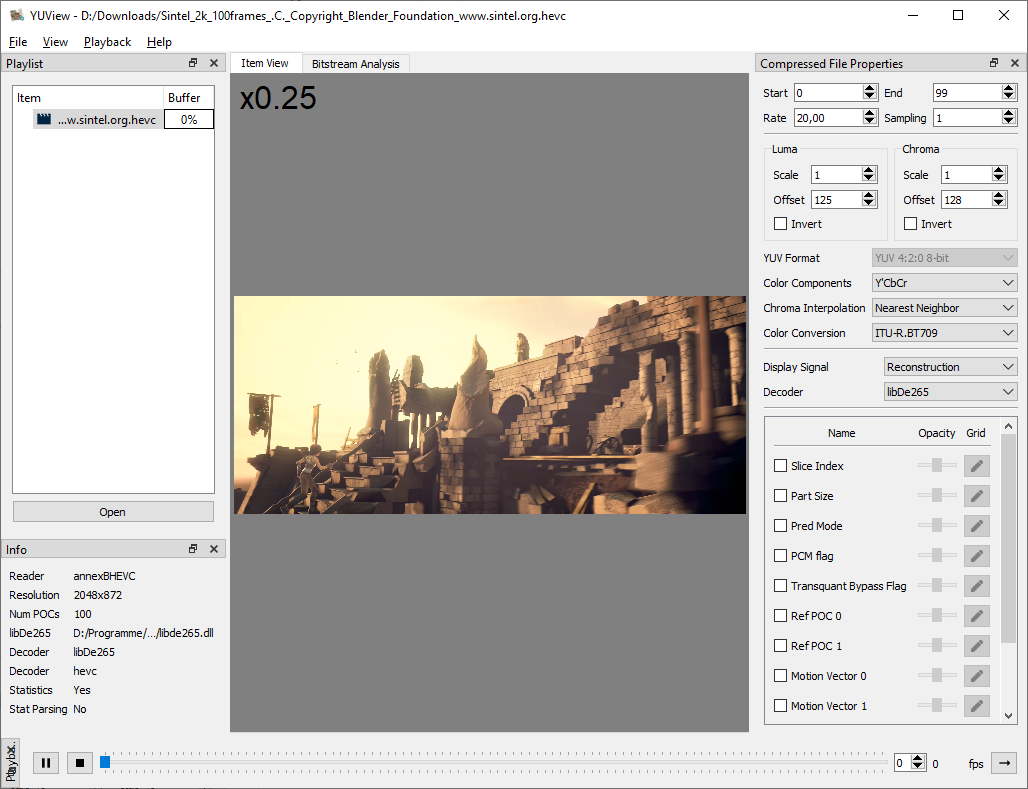
- direct decoding of raw h.265/HEVC bitstreams with visualization of internals like prediction modes and motion vectors and many more
- interface with visualization for the reference software decoders HM and JEM
- support for opening almost any file using FFmpeg
- image comparison using side-by-side and comparison view
- calculation and display of differences (in YUV or RGB colorspace)
- save and load playlists
- overlay the video with statistics data
- ... and many more
Further details of the features can be found either here or in the wiki.
Screenshot of YUView:
You can download precompiled binaries for Windows and MAC from the release site which are all compiled on Github Actions. On the release page you can find:
- Windows installer
- Windows zip
- Mac OS Application
- Linux Appimage
On MacOS, just extract the zip file to your Application folder and remove it from quarantine:
xattr -d com.apple.quarantine /Applications/YUView.app
If you have Ubuntu 22.04 or newer, you can get YUView from the official repo: sudo apt install yuview. For other Linux based platforms we are also on flathub. More information on YUView on Linux can be found in out wiki page "YUView on Linux".
If none of these apply to you, you can easily build YUView yourself.
Compiling YUView from source requires Qt 6 and CMake. Configure and build the application with:
cmake -S . -B build
cmake --build build --parallel
To also build the unit tests, initialize the GoogleTest submodule and enable the test option:
git submodule update --init --recursive
cmake -S . -B build -DYUVIEW_BUILD_TESTS=ON
cmake --build build --parallel
ctest --test-dir build --output-on-failure
More help on building YUView can be found in the wiki.